

Some people still talk about Home Assistant like you need YAML, coding knowledge, and a quiet evening just to automate a light. That has not been true for a while.
Home Assistant in 2026 does not require coding. It does not require YAML. You can build serious, useful, reliable automations from the UI. Not toy automations. Real ones. But removing the need for YAML was not the end of approachability, because there is another layer underneath it: technical knowledge.
Even with a visual editor, Home Assistant can still ask you to think like the automation engine and the state model. State trigger. Numeric state trigger. Device trigger. Entity state. Attribute. Events. Template.
Those building blocks are powerful, and they are not going away. I still love that they are there. But they are not how most people start.
Most people start with “when motion is detected”, “when the door opens”, “when nobody is home”, or “when the electricity price is lowest today”.
This is why the new automation model matters. It does not just make automations easier. It makes them more powerful too.
Approachability is not the same as less power
Approachability is one of the big goals we have been working on in Home Assistant this year. It is easy to misunderstand that word.
Approachable does not mean “simple because we removed all the advanced parts”. That is the lazy version.
The harder, and much more interesting, version is making Home Assistant easier to start with while keeping the depth that made people fall in love with it in the first place.
That is the path Home Assistant has been on for years now. The UI has become much more capable. Automations have become easier to build, test, understand, and maintain. Dashboards keep getting better defaults. Helpers, blueprints, traces, labels, areas, floors, and the automation editor all moved the product away from “you need to know how everything works internally before you can do anything useful”.
These building blocks are another step in that same direction. They do not hide power. They move the technical knowledge to the place where it belongs.
The translation problem
Automation engines think in primitives. People usually do not.
People think in what they want their home to react to. “When the hallway motion sensor detects movement”. “When the front door opens”. “When the last person leaves”. “When the battery is low”. “When this button is pressed”.
Historically, the next step was often translation. Which entity represents that? Which state does it use? Does it become on, detected, home, not_home, or something else? Do I need a state trigger, a numeric state trigger, a device trigger, a template condition, or an event trigger?
If you know Home Assistant well, that translation is usually fine. Sometimes it is even fun, in the same way untangling headphone cables used to be “fine”.
But that translation is not the goal. The automation is the goal. The new trigger model reduces that translation step by letting Home Assistant offer building blocks that describe the thing that matters, not just the technical representation underneath it.
The first question becomes “what do I want my home to react to?”, instead of “which trigger type do I need?”. Much better.
What changes with the new automation model
We have been building out these new triggers and conditions in Home Assistant Labs. If they become the default, that is more than a setting moving out of a feature-flagged section. It means this becomes the new way of thinking about automations.
The Labs work already shows the direction. We have been evaluating purpose-specific triggers and conditions in Labs since Home Assistant 2025.12, and we have been iterating on them with the community ever since. The goal has stayed the same: describe the thing you actually want to automate, instead of starting with the internal shape of the data.
A simple example is temperature crossed threshold. You can say: when the bedroom drops below 18°C, turn on the heating. Or when the living room climbs above 24°C, start cooling. You do not need to start by thinking about numeric state triggers, entity state changes, attributes, units, templates, or how long a value has been above or below something. The trigger already speaks the language of the thing you care about: the temperature crossed this threshold.
Another good example is battery low. That one sounds almost boring, which is exactly why I like it. You do not need to know whether a device exposes battery as a percentage sensor, what state value counts as low, or which entity to inspect. You can build around the moment that matters: a battery-powered device needs attention.
For me, that is what approachability should look like: not less capable, just closer to how people already think about their home. The automation starts with intent, not with Home Assistant internals.
They also support targets, which is a bigger deal than it might sound at first. You can build an automation around motion being detected in the living room, not around one specific motion sensor entity. If you have one motion sensor in that room, fine. If you have ten, also fine. If you replace one later, add another one, or remove the awkward sensor that kept seeing the cat, the automation can follow the living room as a target instead of turning into another thing you have to remember to maintain.
A practical example: when motion is detected outside, turn on the lights outside. The trigger is about the outside area, and the action is about the outside lights. If I later change which sensors cover the outside, replace a light, add another fixture, or move things around, the automation can keep describing the same intent. Motion outside turns on lights outside.
In my own setup, I also only do this when I am away, because context matters. The important bit is still the same: the automation is built around outside motion and outside lights, not around a hand-maintained list of individual entities.
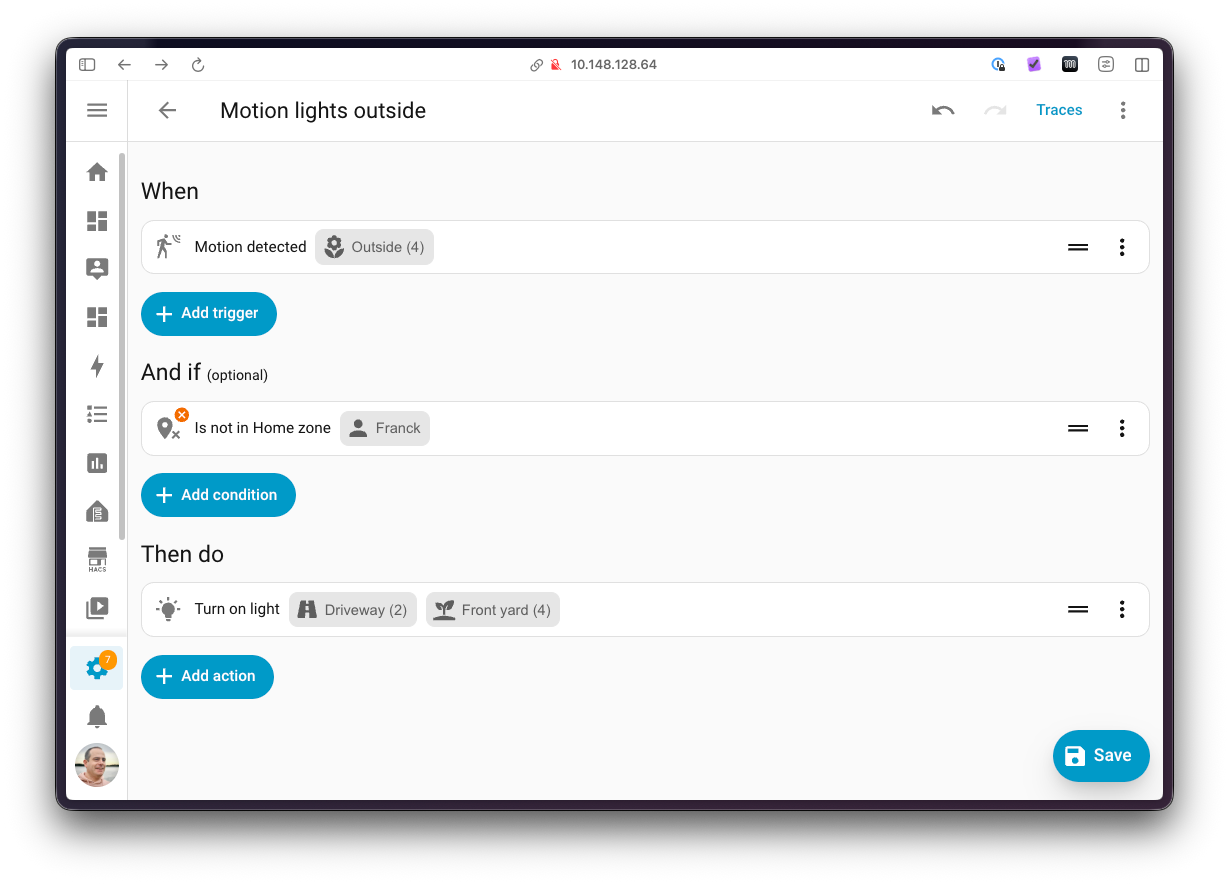
That lowers the maintenance burden in a very practical way. The automation describes the area and the purpose, not a fragile list of devices you need to keep up to date forever.
More power, not just nicer wording
The easy mistake is to see the new triggers and conditions as friendly wrappers around the old stuff. They are more than that.
Some of these new building blocks make things possible that were previously hard, awkward, or not realistically something most people would build themselves. They can handle domain-specific behavior, avoid edge cases, and expose moments that matter directly instead of forcing every user to rebuild the same logic from lower-level pieces.
The real power shows up when integrations get involved.
This model can be extended by integrations, including custom and community-provided integrations. That means an integration can bring its own automation language into Home Assistant.
An integration does not only know which devices & entities it provides. It also knows what those mean. It knows which state changes matter, which states should be ignored, which edge cases are normal, and what a useful automation moment looks like for that domain.
A sensor can tell you the electricity price. The integration can tell you when that price matters. I would much rather have that knowledge in the integration than copied into everyone’s personal template collection.
Instead of every user building a template to find the lowest energy price of the day, an integration could expose “when the price is lowest today”. Instead of every user learning the weird details of a niche heat pump, EV charger, ventilation system, alarm panel, or utility provider, the integration can expose the triggers and conditions that make sense for that world.
This is where it becomes more than a user experience improvement. It becomes an extension point for the automation engine itself: more power, less complexity.
Fewer sharp edges
There is another benefit that is less flashy, but very real: fewer technical traps.
With this newer model, you often do not need to care about implementation details like unknown or unavailable states. The building block can handle those in the way that makes sense for its purpose. That matters, because the moment a user has to know whether a specific automation should ignore unavailable, wait through it, treat it as false, or avoid being triggered by it at all, we have already made them care about the wrong thing.
Event entities are another good example. If you have ever tried to automate around an event entity using a complex state trigger, you may have found the fun little surprise: it might not trigger the second time the same event happens, because the state itself did not change in the way you expected.
That is technically explainable, but it is also not something most people should have to understand just to automate their home. A modern trigger can express the event directly, instead of making you automate around the state representation of that event.
This is the kind of polish that does not always look spectacular in a screenshot, but makes a huge difference in daily use.
No, you do not need to rewrite your automations
Let me answer the obvious question before someone opens a forum thread with mild panic: no, you do not need to rewrite all your automations.
If your automations work today, let them work. Your home is not a refactoring exercise.
Existing automations keep working. Generic triggers keep working. Conditions keep working. Templates keep working. YAML keeps working. The new model becomes the better starting point for new automations, and a nicer option when you decide to improve an existing one. It is not a migration tax.
Home Assistant has always treated automations as something that matters. They are not throwaway configuration. They become part of how your home works. Backwards compatibility is part of the design and trust contract.
A mature platform does not remove its primitives just because it adds better building blocks.
YAML is still there, but it is not the price of admission
I want to be very clear about this, because this topic always attracts the same worry: this is not Home Assistant moving away from YAML.
YAML remains important. Templates remain important. Generic triggers and conditions remain important. For many of us, they are still a great way to express advanced automations, review changes, copy patterns, and keep things exactly how we want them.
But YAML is not required to use Home Assistant in 2026. Coding is not required either. That has been true for a while now, even if Home Assistant’s older reputation still sticks around in some corners of the internet.
The new automation model takes this another step further. It does not only reduce the need for YAML or code. It reduces the need for Home Assistant-specific technical knowledge before you can build something useful.
None of this means we only care about the UI experience. We spent a lot of time making this work well in YAML too. It should look nice, feel natural, and read like something a human would actually write. If you prefer the good old YAML, you should have an amazing experience as well.
We have shown that before. In Home Assistant 2024.8, we changed the YAML syntax from service to action, because actions are what you perform in an automation. Around the same cleanup, we also made automation YAML read more naturally by using sections like triggers, conditions, and actions, and by moving away from the old platform key in favor of wording that says what the item actually is.
alias: Turn on light when motion is detected
triggers:
  - trigger: motion.detected
    target:
      area_id: living_room
actions:
  - action: light.turn_on
    target:
      area_id: living_room
The new triggers and recently the improved YAML syntax are pretty darn nice!
None of that was needed to make the UI nicer. It was done because wording matters in YAML too. The old syntax still works, because backwards compatibility matters, but the recommended syntax became easier to read and easier to explain.
User experience is not a synonym for “the UI”. YAML users deserve good user experience too. Their interface just happens to be text. The goal is not UI-only. The goal is a better model everywhere.
Open source can be approachable too
There is also an open-source story here that I think is worth calling out.
Home Assistant has proven over the last few years that an open-source project can grow from a technical product into a user-friendly product that is accessible to almost anyone, while keeping the power that made it special in the first place.
That is not a small thing. Many products become easier by removing options. Home Assistant is trying to do the harder version: make the common path friendlier, while keeping and even adding more power for people who want to go deeper.
This new automation model makes the first step more approachable, but it does not take away the underlying primitives. It also opens new doors for integrations and custom integrations to make Home Assistant’s automation engine more capable than before.
That is the version of open source I care about. Not a tool only for people who already speak the language, but a project that keeps lowering the first step without lowering the ceiling.
Documentation is part of the feature
We also did the boring work, which in projects like this is often the important work.
Each available trigger, condition, and now action has its own dedicated documentation page.
These pages explain what the building block is, when you might use it, how to use it from the automation editor in the UI, how it works if you prefer writing YAML, and they include real examples.
There is a lot of it, on purpose. Approachability is not only about making a nicer button in the UI. It is also about helping people understand what that button means, what it does, and when to use it. Good documentation is product work, even if it does not get a fancy screenshot in the release notes.
Better for people, better for AI too
There is also an AI angle here, but I want to keep it in the right place. This work is for people first. It makes automations easier to create, easier to read, and easier to maintain. But yes, AI probably benefits from this as well. Annoyingly, maybe even a lot.
Many of you already use AI to help create automations. Sometimes that works surprisingly well. Sometimes it confidently produces something that looks almost right, which is always my favorite kind of wrong.
Having more specific, well-described building blocks gives those tools better material to work with. Their output can become more consistent because the model has less Home Assistant translation to invent on its own.
It will probably take a little while. Most current models are trained on older Home Assistant examples, so they may keep suggesting older patterns for a bit.
That is another reason the documentation matters so much. The better the source material, the easier it becomes for humans and machines to learn the new way.
The new default mental model
If this becomes the default, that matters, because defaults teach people how Home Assistant thinks.
The old default mental model was powerful, but engine-shaped. You started by choosing the type of trigger or condition that matched the internal representation of the thing you cared about. The new default starts closer to intent: what do you want your home to react to?
That is the question I want Home Assistant to ask first.
Home Assistant is not becoming less powerful. It is becoming less necessary to understand all of that power before you can use it. And for those who do want to go deeper, there is more power to reach for, not less.
More power, fewer sharp edges, and less complexity. That is a pretty good direction for automations.
../Frenck